

Description
Red Beach Theme for Chrome
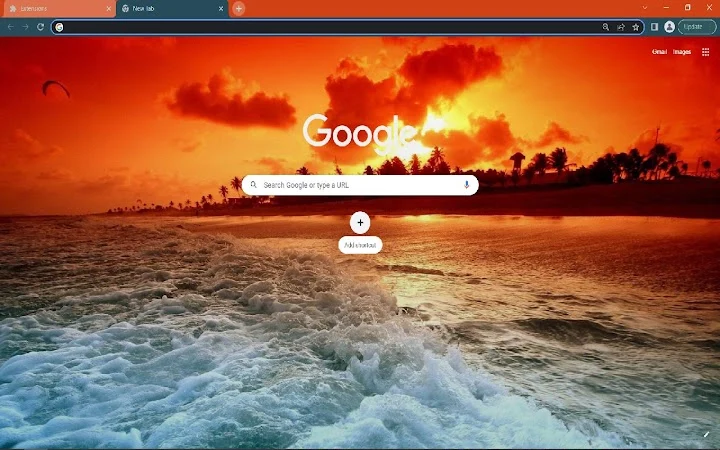
Google Chrome users seeking a vibrant desktop aesthetic can explore this custom theme featuring a beach scene with red color accents. Designed for visual appeal, the theme transforms the browser’s appearance with a 1920x1080 background image and a bold red color scheme. It is intended for users who enjoy personalizing their browsing environment with dynamic, immersive visuals. The theme is suitable for casual users and enthusiasts who value visual customization over functional enhancements. It may be used to refresh the look of a daily browser interface, particularly for those who appreciate coastal imagery and energetic red tones. The developer did not provide additional details about the theme’s creation process or design philosophy.
Key Features & Capabilities
- Beach Background Image – A high-resolution 1920x1080 image of a beach scene serves as the primary visual element, creating a calming yet lively atmosphere within the browser interface.
- Red Color Theme – The theme applies a consistent red tint to the browser’s toolbar, tabs, and buttons, enhancing visual cohesion and providing a bold, modern look.
- Browser Customization – Designed specifically for Google Chrome, it modifies the appearance of the user interface without altering core functionality.
- Easy Installation – The theme can be applied directly through Chrome’s theme gallery or via a downloadable .crx file, allowing quick integration into the browsing experience.
- Visual Immersion – The combination of the beach image and red accents aims to create a visually engaging environment, ideal for users who use their browser as a primary workspace.
Users may apply this theme to enhance the aesthetic of their desktop environment, particularly during leisure browsing or creative work sessions. The theme is not intended for productivity gains but rather for personal expression and visual satisfaction. It can be used to differentiate a personal device from shared or work machines. The developer did not specify additional customization options or interactive elements.
User Interface, Workflow & Performance
The theme modifies only the visual aspects of Google Chrome, leaving all core functions intact. The user interface remains consistent with Chrome’s standard layout, with the beach image displayed behind the tabs and the red color scheme applied to the toolbar and buttons. Navigation remains unaffected, and users can access all standard features such as bookmarks, extensions, and settings without disruption. The workflow is unchanged, as the theme does not introduce new tools or processes.
Performance observations are based on general software behavior patterns. The developer did not specify resource usage details. No impact on CPU or RAM usage was reported. The theme is expected to have minimal performance overhead, as it does not include animations or scripts. Stability is assumed to be consistent with Chrome’s standard theme handling. The theme does not interfere with browser updates or session management.
Compatibility & System Requirements
The theme is compatible with Google Chrome on both Windows and Mac operating systems. No specific version requirements were listed. Installation size is not provided. The developer did not specify hardware requirements or platform-specific limitations. Compatibility information was partially provided. Users are advised to ensure their Chrome browser is up to date for optimal theme rendering. The theme is designed for desktop use and does not support mobile or tablet platforms.
Pros and Cons
Pros
- Visually striking beach background with high-resolution image quality
- Bold red color scheme enhances visual identity and modern appeal
- Simple and fast installation via Chrome’s theme system
- Free to use with no hidden costs or in-app purchases
- Safe and lightweight, with no known performance impact
Cons
- Does not include functional enhancements or productivity tools
- Limited customization options beyond the default theme settings
- Background image is static and does not change over time
- Not suitable for users seeking practical browser improvements
- Theme may not appeal to users preferring minimalist or neutral color schemes
FAQ Section
Is this theme compatible with all versions of Chrome?
Compatibility is confirmed for Google Chrome on Windows and Mac. Specific version requirements were not provided by the developer.
Is the theme safe to install?
Yes, the theme is designed for Chrome’s official theme system and does not include malicious code. It is free from known security risks.
Can I update the theme automatically?
Updates are managed through Chrome’s theme gallery. If a new version is released, users may receive a notification to update.
Does this theme require an internet connection?
Once installed, the theme operates offline. However, initial installation may require an internet connection to access the theme gallery.
Is the theme available for mobile browsers?
No, the theme is designed exclusively for desktop versions of Google Chrome and is not supported on mobile platforms.
Final Thoughts + CTA
This Red Beach Theme for Chrome offers a compelling visual upgrade for users who prioritize aesthetics in their browsing experience. With its vibrant beach background and bold red accents, it transforms the browser interface into a dynamic, immersive environment. While it does not provide functional improvements, it excels in personalization and visual satisfaction. Ideal for casual users, creative professionals, and Chrome enthusiasts who enjoy customizing their digital workspace, the theme delivers a fresh and energetic look. It is free, safe, and easy to apply, making it accessible to a wide audience. For anyone looking to refresh their browser’s appearance with a touch of coastal energy, this theme is a standout choice.
Download Red Beach Theme for Chrome now
Guides & Tutorials for Beach Browser Theme Theme for Chrome
How to install Beach Browser Theme Theme for Chrome
- Click the Preview / Download button above.
- Once redirected, accept the terms and click Install.
- Wait for the Beach Browser Theme Theme for Chrome download to finish on your device.
How to use Beach Browser Theme Theme for Chrome
This software is primarily used for its core features described above. Open the app after installation to explore its capabilities.
User Reviews for Beach Browser Theme Theme for Chrome 0
No reviews found





